

“It’s Unix.”
That single phrase has protected macOS from serious security scrutiny for years.
The logic sounds convincing: Unix systems have a long history in servers, engineering environments, and infrastructure. If macOS inherits those architectural foundations, it must be secure by design.
But Unix lineage is not a threat model.
Enterprise security doesn’t depend on the operating system’s ancestry. It depends on something far more practical: visibility, policy enforcement, patch discipline, and user behavior controls.
The modern attack environment has shifted dramatically over the past decade. Malware authors no longer focus exclusively on operating systems; they target user behavior, browser ecosystems, SaaS credentials, and software supply chains. In that reality, macOS devices are neither invisible nor immune.
This misconception matters because it leads organizations to make risky assumptions:
- “Macs don’t need antivirus.”
- “Attackers target Windows, not Mac.”
- “Unix permissions make Macs inherently safe.”
None of those statements hold up under real-world enterprise security practice.
This article breaks down the macOS security myth through a practitioner’s lens—examining the difference between architecture and outcomes, the modern attack surface surrounding Mac devices, and the operational challenges of securing a Mac fleet in business environments.
If your organization runs macOS devices—or is considering them—the goal isn’t to abandon them.
The goal is to separate reputation from reality so security decisions are made based on risk, not mythology.
Security Architecture vs. Security Outcomes
The first mistake in the macOS security debate is conflating architecture with outcomes.
macOS does inherit important Unix concepts:
- user permission boundaries
- process isolation
- file ownership models
- command-line security tooling
These mechanisms are useful. But they are only one layer in a multi-layer security posture.
Why Architecture Alone Doesn’t Determine Security
Enterprise security failures rarely occur because the OS lacked a permission system.
They occur because of operational gaps such as:
- delayed patching
- unmanaged applications
- credential theft
- malicious browser extensions
- phishing-based account compromise
In other words, most successful attacks bypass the operating system entirely.
Consider a simple example:
An employee installs a malicious browser extension disguised as a productivity tool. The extension steals session cookies and authenticates into company SaaS platforms.
The operating system’s Unix permission model never comes into play.
The compromise occurs at the application layer, not the OS layer.
Security Posture vs Security Marketing
macOS benefits from a strong reputation for security.
But reputation is not the same as measurable security posture.
Security posture includes:
- endpoint detection visibility
- device compliance monitoring
- patch enforcement
- application allowlisting
- identity protection
- audit logging
Without those controls, even a technically well-designed operating system becomes a weak endpoint in enterprise infrastructure.
Practical takeaway:
Operating system architecture contributes to security, but operational controls determine real-world outcomes.
The Modern macOS Attack Surface
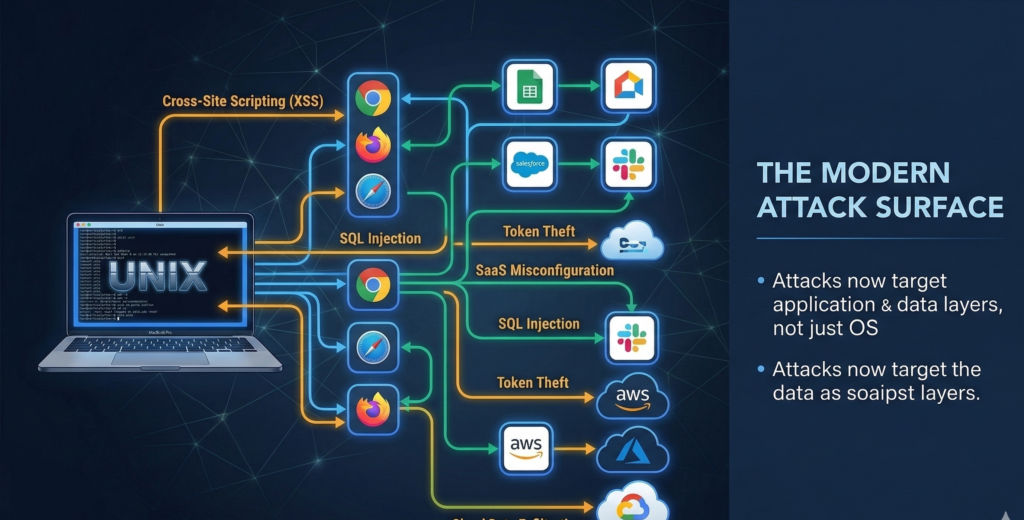
A common misconception is that attackers target operating systems directly.
Modern threat actors rarely operate that way.
They target the environment surrounding the operating system, and macOS devices participate in that environment just like any other endpoint.
Browser Ecosystems
The browser is now the primary attack vector in most organizations.
Common risks include:
- malicious extensions
- credential harvesting scripts
- drive-by downloads
- phishing sites designed to mimic SaaS login portals
These attacks affect Chrome, Safari, and Firefox users regardless of operating system.
Software Supply Chains
Another rapidly growing attack vector involves compromised software packages.
Examples include:
- infected open-source libraries
- trojanized developer tools
- malicious updates in third-party applications
macOS systems are not insulated from this ecosystem. In fact, developer-heavy environments using Macs can increase exposure to supply-chain risks.
User Behavior
Most breaches begin with human actions:
- clicking phishing links
- downloading unauthorized software
- reusing passwords
- installing unsafe browser plugins
No operating system can fully compensate for these behaviors.
Practical takeaway:
The largest attack surfaces for Mac devices are browsers, third-party software, and human behavior—not the operating system kernel.
The Reality of macOS Fleet Management
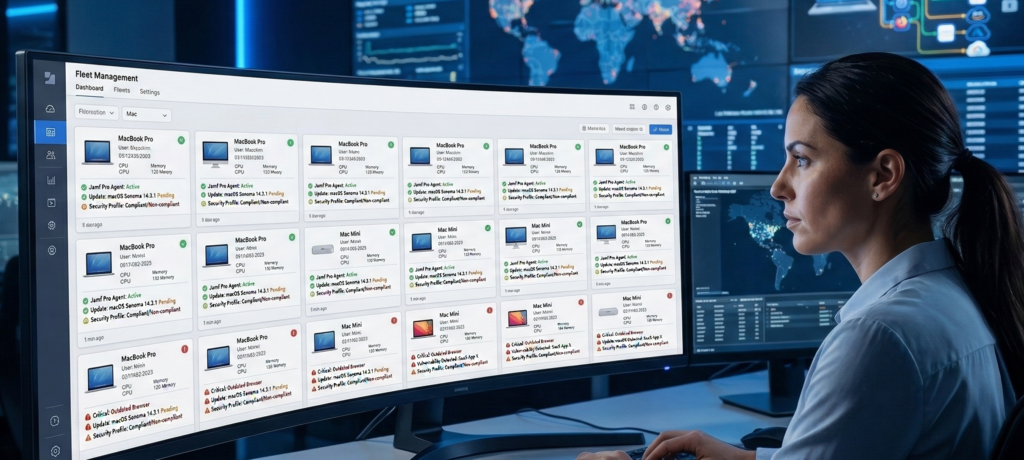
Individual Mac devices can be secure when managed carefully.
But enterprise security operates at a different scale: hundreds or thousands of endpoints.
That’s where macOS deployments encounter operational friction.
Policy Enforcement Challenges
Windows environments have decades of mature enterprise policy tooling.
macOS environments rely on a combination of:
- mobile device management (MDM)
- endpoint agents
- configuration profiles
- identity integrations
This works, but policy enforcement requires deliberate configuration. Out-of-the-box deployments rarely include strong security policies.
Visibility Limitations
Security teams need visibility into endpoint behavior, including:
- application installations
- suspicious processes
- unusual network connections
- device compliance status
Without proper endpoint security tooling, Mac devices can become visibility blind spots in mixed operating system environments.
Patch Discipline
macOS updates are frequent, but enterprise patch management still requires:
- staged rollout policies
- compatibility testing
- compliance monitoring
When organizations rely on employees to manually install updates, patch delays create vulnerability windows.
Practical takeaway:
macOS can be securely managed at scale—but only with strong endpoint management infrastructure and policy discipline.
The Most Common macOS Security Misassumptions
Many organizations operate Macs under assumptions that were once partially true but are no longer accurate.
Let’s examine the most common ones.
“Macs Don’t Need Antivirus”
Historically, macOS malware volumes were lower than Windows.
That gap has narrowed significantly.
Modern Mac malware often focuses on:
- adware loaders
- credential stealers
- cryptocurrency miners
- supply-chain implants
Enterprise endpoint protection for macOS is now standard practice.
“Hackers Don’t Target Macs”
Attackers target users and data, not operating systems.
If a Mac device contains valuable information or provides access to corporate systems, it becomes a viable target.
Industries heavily reliant on Mac devices—such as creative agencies, SaaS startups, and development teams—are increasingly attractive attack surfaces.
“Unix Permissions Make Macs Secure”
Unix permission systems protect against certain local privilege abuses.
But modern attacks frequently occur through:
- web sessions
- API tokens
- cloud identity credentials
Those layers sit above the operating system.
Practical takeaway:
macOS security myths persist because of outdated threat models, not current attack realities.
macOS Security Checklist for Businesses
Organizations using macOS should approach security systematically rather than relying on platform reputation.
Use the following checklist to evaluate your environment.
Endpoint Security Controls
- Endpoint detection and response (EDR) deployed
- Antivirus or behavioral protection enabled
- Device compliance monitoring active
Identity Protection
- Multi-factor authentication enforced
- Single sign-on logging monitored
- Credential reuse detection in place
Application Controls
- Approved software lists enforced
- Browser extension policies configured
- Software update monitoring enabled
Device Management
- MDM platform controlling device configuration
- Security policies automatically applied
- Patch compliance reporting enabled
Monitoring and Logging
- Endpoint telemetry integrated into security monitoring
- Audit logs retained and reviewed
- anomaly alerts configured
Scoring framework
| Score | Security Posture |
|---|---|
| 4–5 categories implemented | Mature Mac security posture |
| 2–3 categories implemented | Moderate risk |
| 0–1 categories implemented | High exposure |
Practical takeaway:
macOS becomes secure through management discipline, not simply by choosing the platform.
Choosing Technology Based on Risk, Not Myth
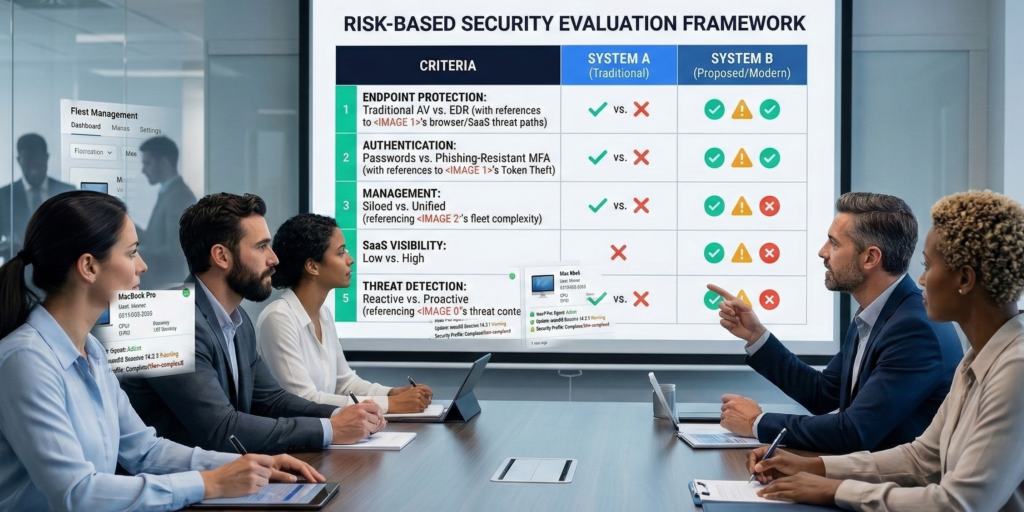
The goal of this discussion is not to argue that macOS is insecure.
Many organizations run Mac environments successfully and safely.
The real problem arises when platform reputation replaces risk analysis.
Technology decisions should account for:
- operational visibility
- compliance requirements
- workforce behavior patterns
- integration with existing security tools
- administrative overhead
In many environments, a mixed operating system ecosystem is inevitable.
The important step is ensuring that every endpoint—Mac or otherwise—meets consistent security standards.
Organizations that want to simplify that evaluation often rely on managed IT partners who analyze environments from a risk-first perspective rather than platform loyalty. Firms like Carefree Computing specialize in helping businesses design endpoint strategies around operational security and management realities instead of operating system mythology.
Practical takeaway:
Security maturity depends on controls, monitoring, and management—not brand reputation.
FAQ: macOS Security in Business Environments
Is macOS inherently more secure than Windows?
macOS includes strong architectural security features, but enterprise security depends on configuration and monitoring, not operating system design alone. A poorly managed Mac environment can be less secure than a well-managed Windows environment with strong endpoint protection and identity controls.
Do Mac computers need antivirus or endpoint protection?
Yes. Modern Mac environments benefit from endpoint detection and response tools or antivirus solutions. Malware targeting macOS has increased in recent years, and endpoint protection provides visibility into suspicious behavior, unauthorized applications, and malicious scripts.
Why do people believe Macs are immune to malware?
The perception comes from earlier years when macOS had significantly fewer malware families than Windows. That gap has narrowed as Mac adoption has increased in business environments, making it a more attractive target for attackers.
What is the biggest security risk for macOS users today?
The largest risks are phishing attacks, malicious browser extensions, and credential theft through SaaS platforms. These threats often bypass the operating system entirely and focus on web-based access to corporate systems.
Can macOS be secure in enterprise environments?
Yes. When combined with mobile device management, endpoint protection, patch enforcement, and identity security controls, macOS devices can operate safely in enterprise networks. The key requirement is consistent security policy enforcement across the entire device fleet.
Conclusion
Operating systems develop reputations that persist long after the threat landscape evolves.
macOS gained its reputation from Unix heritage, architectural design, and historically lower malware volume. But enterprise security no longer revolves around kernel exploits or file permission models.
Today’s attacks focus on identity, browsers, software supply chains, and user behavior.
In that environment, the operating system is only one component in a much larger security architecture.
Organizations that understand this distinction stop asking, “Is macOS secure?”
They start asking better questions:
- Do we have endpoint visibility?
- Are devices consistently managed?
- Can we detect abnormal behavior quickly?
- Are identity systems protected?
Those questions determine real security outcomes.
macOS can absolutely fit into a secure enterprise environment—but only when it’s treated as an endpoint to manage, not a platform to trust blindly.
Security maturity begins the moment mythology ends.