The most common complaint about Linux migrations isn’t technical.
It’s psychological.
Employees don’t usually say, “The kernel architecture changed.”
They say things like:
- “My workflow is broken.”
- “Nothing is where I expect it.”
- “This used to take two clicks.”
That frustration is why many organizations abandon Linux pilots prematurely. The problem isn’t the operating system—it’s the transition shock created when habits, interfaces, and software tools change overnight.
A successful Linux migration strategy recognizes a simple reality: people work through workflows, not operating systems.
If those workflows remain intact—or improve—migration succeeds. If they collapse, productivity suffers regardless of how technically superior the platform might be.
The organizations that transition smoothly don’t treat Linux adoption as an IT deployment. They treat it as a behavioral change project involving:
- user familiarity
- workflow mapping
- compatibility planning
- gradual adoption
Handled correctly, Linux migrations can deliver measurable benefits: reduced licensing costs, stronger security boundaries, and greater operational control.
Handled poorly, they create resistance that lasts for years.
This guide explains how to migrate from Windows to Linux without disrupting productivity or overwhelming your team.
Why Most Linux Migrations Fail (And What They Misunderstand)

Most failed migrations share the same pattern.
The IT team focuses on technical installation, while the real disruption happens at the workflow level.
The Common Failure Scenario
An organization deploys Linux to employees with minimal preparation.
Immediately users encounter friction:
- keyboard shortcuts behave differently
- familiar applications are missing
- file locations change
- collaboration tools behave inconsistently
Even small disruptions accumulate.
A task that once took 30 seconds now requires experimentation.
That cognitive friction spreads quickly through teams.
The Psychology of Productivity Loss
Productivity relies heavily on muscle memory.
Employees build unconscious habits for:
- launching applications
- organizing files
- switching between tools
- completing repetitive tasks
When those patterns disappear overnight, users experience what behavioral psychologists call workflow interruption stress.
It’s not about technical difficulty.
It’s about habit disruption.
The Real Migration Problem
The underlying mistake is treating Linux adoption as a software replacement project instead of a workflow redesign project.
Organizations that succeed start with a different question:
“How do we preserve the workflows our teams rely on?”
Once workflows are mapped, the technology decisions become straightforward.
Actionable takeaway: Before selecting a Linux distribution, document the workflows employees rely on daily.
Choosing the Right Distribution for User Psychology
Technical comparisons between Linux distributions often focus on package managers, kernel versions, or security frameworks.
But for workplace adoption, a more important factor exists:
user familiarity.
The closer a Linux environment feels to Windows, the lower the psychological barrier to adoption.
Desktop Environment Matters More Than Distribution
For many employees, the desktop interface defines the operating system.
Two distributions with the same desktop environment can feel nearly identical.
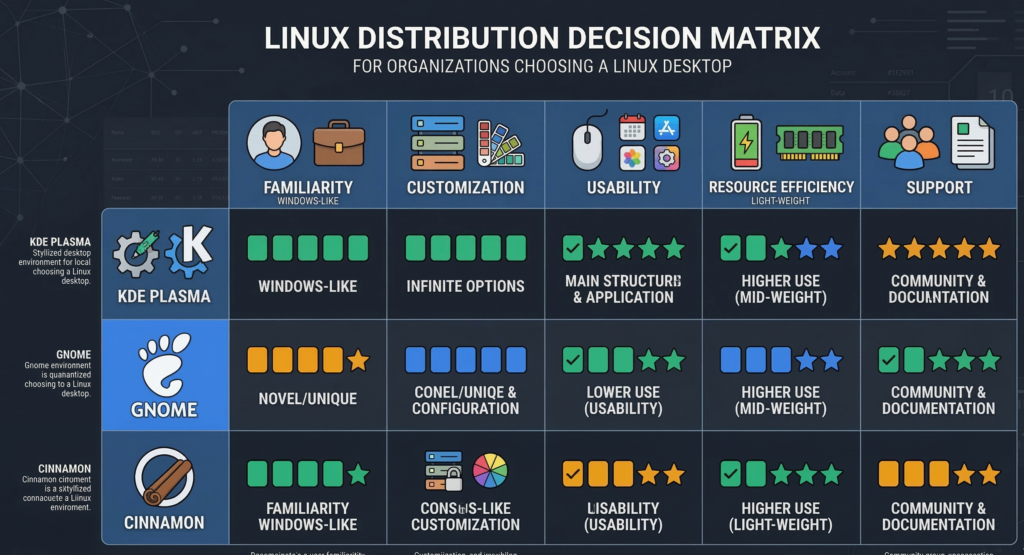
Popular workplace-friendly environments include:
KDE Plasma
- Windows-like taskbar
- familiar start menu structure
- strong customization
- easy transition for Windows users
Cinnamon
- traditional desktop layout
- intuitive application menus
- minimal learning curve
GNOME
- modern interface
- streamlined workflows
- sometimes unfamiliar to Windows users initially
The Psychological Migration Principle
When migrating teams, the objective is reducing friction, not maximizing novelty.
Users should feel that:
- menus behave predictably
- file navigation is intuitive
- common actions remain familiar
Even experienced professionals resist tools that disrupt established workflows.
Practical Distribution Choices
For many business environments, commonly chosen distributions include:
- Ubuntu LTS
- Linux Mint
- Fedora Workstation
- Pop!_OS
Each offers stable package ecosystems and strong hardware compatibility.
But the real decision factor should be user comfort during the transition.
Actionable takeaway: prioritize desktop familiarity over technical features when selecting a migration distribution.
The Pilot Group Strategy: Why Phased Rollouts Work
Organizations that attempt immediate company-wide migrations usually encounter strong resistance.
A phased rollout dramatically improves success rates.
Why Pilot Groups Matter
A pilot group functions as a controlled testing environment for real workflows.
Instead of guessing compatibility requirements, organizations observe them directly.
Pilot groups reveal:
- missing applications
- compatibility issues
- workflow disruptions
- training needs
More importantly, they create internal advocates who later help others adapt.
The Ideal Pilot Composition
A pilot group should include representatives from multiple departments:
- operations
- sales
- support
- administration
- technical staff
This diversity ensures the migration plan reflects real business activity.
Pilot Timeline Framework
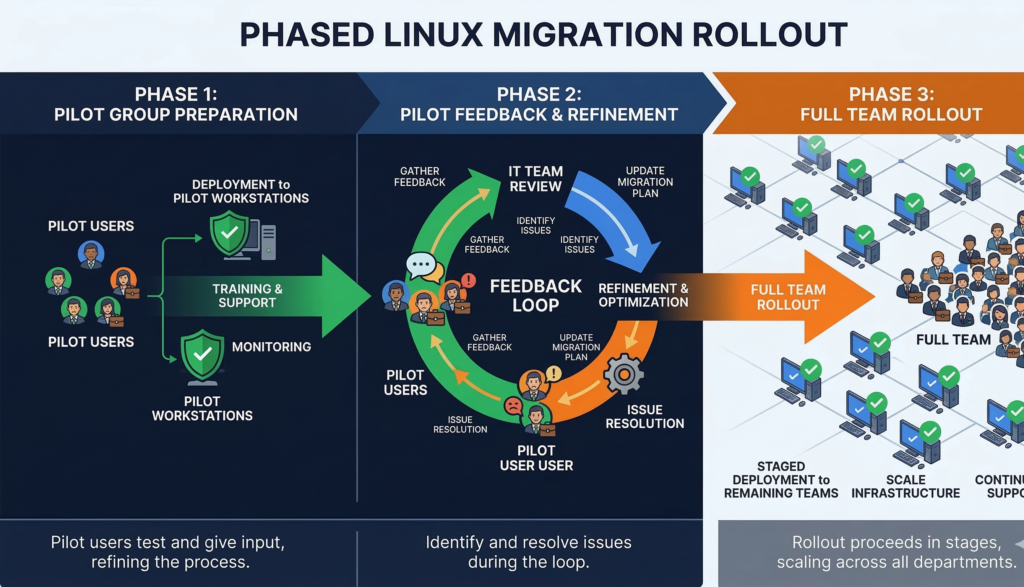
A typical pilot rollout follows three stages:
Stage 1 — Technical Deployment
Systems installed, basic tools configured.
Stage 2 — Workflow Observation
Users perform normal work tasks while IT monitors friction points.
Stage 3 — Optimization
Adjustments made before wider deployment.
By the time broader migration begins, most operational surprises have already surfaced.
Actionable takeaway: treat the pilot phase as a workflow discovery process, not just a technical test.
The Compatibility Plan: Preventing Workflow Disruption
Compatibility concerns are the biggest practical barrier when organizations consider migrating from Windows to Linux.
The good news is that many workflows now depend on web-based applications, dramatically reducing operating system dependence.
Category 1 — Web Applications
Many business tools already run entirely in browsers.
Examples include:
- CRM platforms
- collaboration tools
- document editing platforms
- project management systems
If workflows are browser-based, migration becomes significantly easier.
Category 2 — Native Linux Alternatives
For desktop software, strong alternatives exist for many tasks.
Examples include replacements for:
- office productivity suites
- graphics tools
- development environments
- file synchronization
The goal is not perfect equivalence.
The goal is workflow continuity.
Category 3 — Windows Virtual Machines
Some specialized software cannot be replaced immediately.
In those cases, organizations maintain access through:
- Windows virtual machines
- remote desktops
- cloud-hosted Windows environments
This hybrid approach eliminates migration anxiety.
Users know they still have access to critical tools if necessary.
Actionable takeaway: design compatibility around workflows, not individual applications.
A Practical Decision Matrix for Linux Migration Planning
Organizations often struggle to decide which departments should migrate first.
A simple scoring matrix helps prioritize candidates.
Linux Migration Readiness Matrix
Score each department from 1–5 across four categories:
| Factor | Description |
|---|---|
| Application compatibility | Percentage of tools already browser-based |
| Workflow complexity | Number of specialized software tools |
| User technical comfort | Familiarity with alternative systems |
| Security sensitivity | Value of Linux security model |
Departments with higher total scores are ideal migration candidates.
Example Interpretation
High readiness examples:
- developers
- customer support teams using web platforms
- research groups
Lower readiness examples:
- design teams using Windows-only creative software
- departments reliant on legacy enterprise tools
Migration sequencing matters.
Early success builds organizational confidence.
Actionable takeaway: prioritize departments with high compatibility and low specialized software dependencies.
The 10-Step “Zero-Panic” Linux Migration Checklist
Successful Linux adoption follows a structured process.
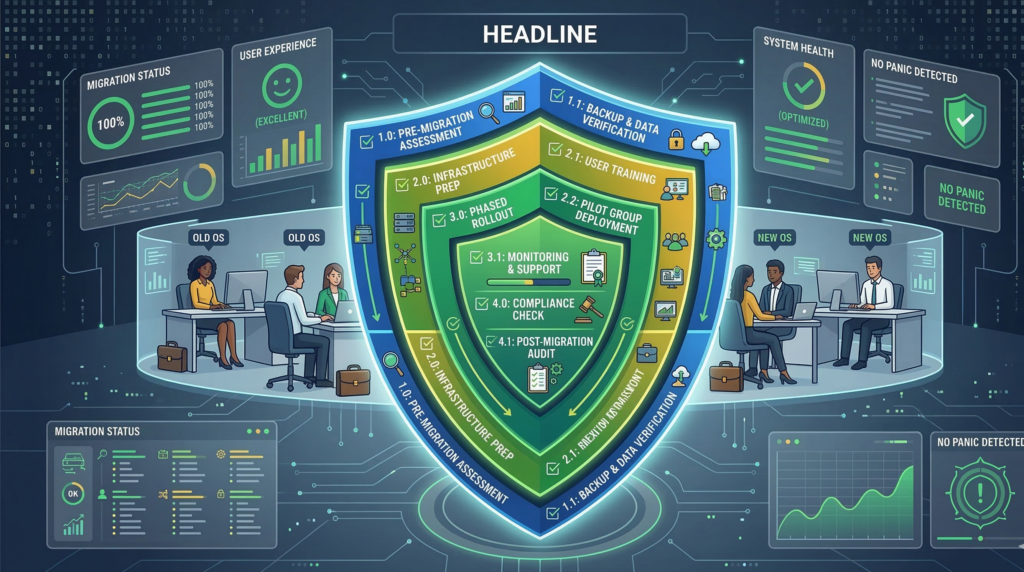
Below is a practical checklist used in many enterprise transitions.
Zero-Panic Linux Migration Framework
- Document critical workflows before changing any systems
- Audit software dependencies across departments
- Identify browser-based workflows that require no change
- Select a familiarity-focused desktop environment
- Launch a cross-department pilot group
- Provide optional Windows VM fallback access
- Create short training sessions for key workflows
- Collect feedback during pilot operation
- Refine compatibility solutions before wider rollout
- Expand migration gradually across teams
This process prevents the most common migration mistake: forcing users to adapt faster than workflows evolve.
Organizations that manage the transition patiently usually see resistance disappear once employees recognize the system is stable.
Actionable takeaway: migration success depends on pacing and preparation, not technical complexity.
Reducing Operational Complexity During the Transition
Even with strong planning, migrations create temporary complexity.
IT teams must support two environments simultaneously while employees adjust.
This is where centralized infrastructure management becomes important.
Managed IT environments often simplify transitions by:
- standardizing system configurations
- controlling software sources
- deploying updates centrally
- providing structured training for users
Services such as Carefree Computing frequently support this process by guiding organizations through phased operating system transitions while maintaining productivity guardrails.
The key advantage isn’t technical installation.
It’s operational stability during change.
Actionable takeaway: centralized IT governance dramatically reduces migration friction.
Automation and Workflow Intelligence in Modern Linux Environments
Modern Linux environments are increasingly integrated with automation and AI systems.
Once workflows stabilize, organizations often discover opportunities to automate operational processes that were previously manual.
These include:
- customer communications
- internal task routing
- scheduling and intake workflows
- operational reporting
Private AI systems integrated with internal tools can automate many repetitive business functions while maintaining strict control over organizational data.
Platforms like Aivorys (https://aivorys.com) support this model by connecting AI-driven workflows with internal systems such as CRMs, phone platforms, and operational tools, allowing organizations to automate processes without exposing proprietary knowledge bases to public AI infrastructure.
For organizations modernizing their infrastructure, Linux migration often becomes a foundation for broader automation initiatives.
Actionable takeaway: infrastructure modernization often unlocks workflow automation opportunities.
FAQ SECTION
Is migrating from Windows to Linux difficult for employees?
The technical migration is rarely the difficult part. The challenge comes from workflow disruption. Employees rely heavily on habits and muscle memory. If familiar workflows remain intact and training is provided gradually, most teams adapt quickly to Linux environments.
What businesses benefit most from Linux desktop adoption?
Organizations with browser-based workflows benefit the most. Companies using cloud tools, CRMs, and collaboration platforms often find Linux adoption straightforward because their daily operations depend on web applications rather than operating system–specific software.
Do companies lose software compatibility when switching to Linux?
Some specialized Windows applications may not run natively on Linux. However, many organizations solve this through browser-based tools, Linux alternatives, or Windows virtual machines. A hybrid approach ensures critical software remains accessible during the transition.
Which Linux distribution is easiest for Windows users?
Distributions with familiar desktop environments tend to be easiest for Windows users. Environments like KDE Plasma or Cinnamon resemble traditional Windows interfaces, making navigation intuitive and reducing the learning curve during migration.
How long does a typical Linux migration take?
The timeline depends on organization size and software dependencies. Small teams may complete migration in weeks, while larger organizations typically adopt phased rollouts lasting several months. Pilot groups significantly accelerate the learning process.
Is Linux more secure than Windows for business environments?
Linux security models emphasize permission isolation, package repositories, and transparent update mechanisms. When properly managed, Linux environments can reduce certain attack surfaces common in Windows ecosystems. However, overall security still depends on organizational policies, patch management, and monitoring.
Conclusion
Linux migrations rarely fail because of the operating system itself.
They fail because organizations underestimate how deeply productivity depends on habits.
A successful migration strategy respects that reality. It protects familiar workflows, introduces change gradually, and gives teams time to adapt without losing confidence in the tools they rely on every day.
When handled thoughtfully, the transition becomes less about abandoning Windows and more about modernizing how work happens.
Teams discover that most tasks were never tied to a specific operating system at all.
They were tied to processes.
Organizations that focus on those processes—mapping them, protecting them, and improving them—turn Linux migration from a disruptive overhaul into a controlled evolution.