
Your endpoint dashboard says “Protected.” Your EDR agent is green. Patches are current.
And then an attacker loads a legitimately signed but vulnerable driver and disables your security stack from inside the kernel.
That is the reality of BYOVD attacks. Bring Your Own Vulnerable Driver is not theoretical. It is a recurring Windows weakness that exploits the complexity of kernel driver trust. Once malicious code gains kernel-level execution, many defensive tools lose visibility or control.
For IT leaders in SMB and mid-market environments, this is uncomfortable. You can deploy reputable security software and still lose at the kernel boundary. The problem is not that your tools are ineffective. The problem is that driver trust is extraordinarily difficult to police at scale.
This article explains how BYOVD attacks work, why traditional blocklists and driver signing are insufficient, and what layered defenses actually reduce risk. You will leave with a practical mitigation checklist built for real-world constraints—not lab environments.
What BYOVD Attacks Actually Are — and Why They Work
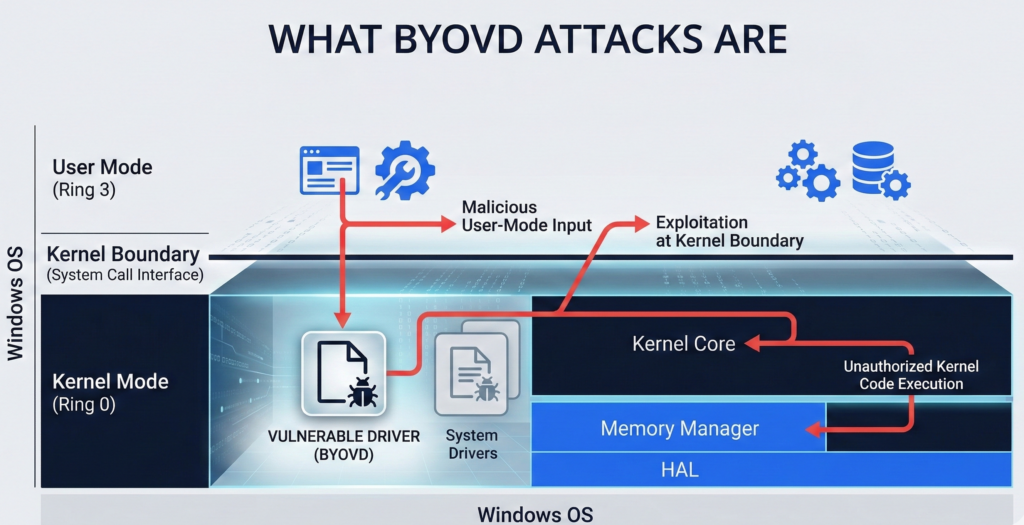
Definition: BYOVD in Plain Terms
A BYOVD attack occurs when an attacker installs a legitimately signed but vulnerable Windows kernel driver to exploit its flaws and gain elevated privileges. Once loaded, the vulnerable driver is abused to disable security tools, manipulate memory, or execute arbitrary code at the kernel level.
Micro-insight: The driver itself may not be malicious. The vulnerability is the weapon.
Why Signed Drivers Become Attack Tools
Windows requires kernel drivers to be signed. That control is meant to prevent unsigned, arbitrary kernel code from loading. However:
- Many drivers are signed by trusted vendors.
- Vulnerabilities in those drivers are later discovered.
- The drivers remain loadable if not blocklisted.
Attackers simply bring their own copy of an old, vulnerable but properly signed driver.
This bypass works because trust is binary at load time. The OS checks the signature. It does not automatically assess exploitability in context.
Kernel-Level Impact
Once exploited, the vulnerable driver can:
- Terminate EDR processes
- Disable security callbacks
- Modify protected memory
- Escalate privileges to SYSTEM
At that point, user-mode protections become secondary.
Actionable Takeaway
Assume that driver signing alone does not equal safety. Inventory your environment for third-party drivers and identify whether blocklists are actively enforced—not just enabled by default.
Why Blocklists and Driver Signing Aren’t Enough
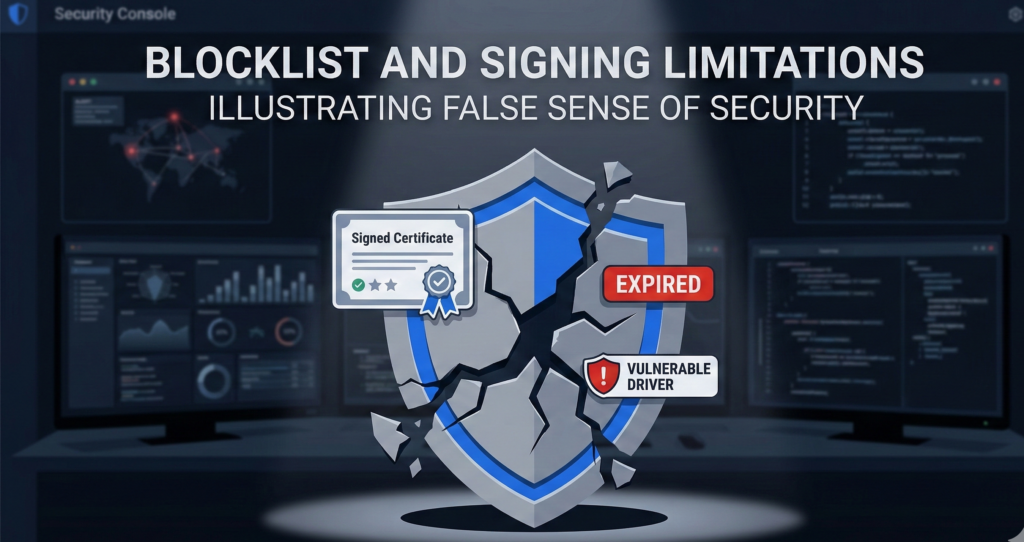
The Vulnerable Driver Blocklist Gap
Microsoft maintains a vulnerable driver blocklist. However, real-world issues persist:
- Blocklists are not always enabled in all configurations.
- Updates may lag behind newly discovered vulnerabilities.
- Enterprises sometimes disable enforcement for compatibility reasons.
Micro-insight: Security controls that break business apps tend to get turned off.**
This creates drift between theoretical protection and operational reality.
Signing Does Not Equal Safe
A signed driver can still:
- Contain privilege escalation flaws
- Expose unsafe IOCTL interfaces
- Allow arbitrary memory read/write
Signature validation confirms origin—not security posture.
The Compatibility Dilemma
Organizations running specialized hardware, legacy applications, or vertical industry systems often rely on older drivers. Removing them may disrupt operations. This creates an implicit risk acceptance posture.
Research and practitioner experience show that many ransomware operators actively test known vulnerable drivers as part of their playbooks.
Actionable Takeaway
Do not rely solely on automatic blocklists. Conduct quarterly driver audits and validate that enforcement policies are active and compatible with your line-of-business applications.
The Real Risk: Kernel Boundary Collapse
Most IT leaders understand privilege escalation. Fewer fully internalize what kernel access means.
When an attacker crosses the kernel boundary:
- EDR telemetry can be tampered with
- Process protection can be removed
- Credential protections can be bypassed
This is why ransomware chains often follow a pattern:
- Initial access via phishing or exposed service
- Local privilege escalation
- Driver-based EDR disablement
- Lateral movement and domain impact
Micro-insight: Once kernel integrity is compromised, detection becomes reactive rather than preventative.**
The defensive goal shifts from blocking everything to limiting blast radius.
Actionable Takeaway
Model kernel compromise as a realistic scenario in tabletop exercises. If your containment strategy assumes intact EDR, it is incomplete.
Layered Defenses That Reduce BYOVD Risk
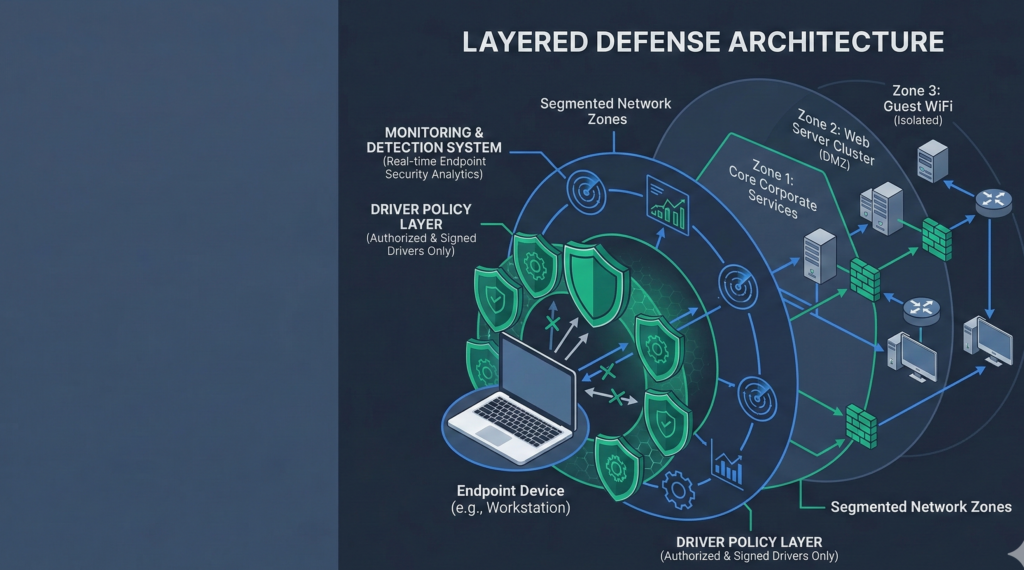
No single control eliminates BYOVD attacks. Risk reduction comes from layered enforcement.
1. Least Privilege Enforcement
Attackers often require administrative rights to load drivers. Removing persistent local admin access significantly reduces feasibility.
- Enforce Just-In-Time privilege elevation
- Remove shared admin credentials
- Audit privileged group membership monthly
2. Application Control and Driver Policies
Use Windows Defender Application Control or similar policy-based controls to restrict which drivers can load.
- Explicitly allow only known-good drivers
- Block outdated driver hashes
- Validate enforcement mode, not audit mode
3. Monitoring for Driver Installation Events
Log and alert on:
- New driver installations
- Changes to system driver directories
- Service creation tied to driver loads
Kernel compromise attempts leave artifacts before execution.
4. Network Segmentation and Lateral Movement Controls
If driver-level bypass occurs, segmentation prevents rapid spread.
- Separate user workstations from servers
- Enforce SMB signing and credential guard
- Limit east-west traffic
Organizations building AI automation and internal workflow systems should be particularly strict about segmentation. Platforms like Aivorys (https://aivorys.com) operate within private deployments where governance, audit controls, and infrastructure boundaries matter. Kernel-level compromise in such environments must be assumed possible and architecturally contained.
Actionable Takeaway
Treat BYOVD mitigation as layered architecture, not a checkbox. Combine privilege control, application policies, and network segmentation.
BYOVD Mitigation Checklist for SMBs

Use this structured review quarterly.
Driver Hygiene
- Inventory all installed kernel drivers
- Remove unused or legacy drivers
- Verify vulnerable driver blocklist enforcement
Privilege Governance
- Eliminate persistent local admin rights
- Implement approval-based elevation
- Monitor privileged account activity
Application Control
- Deploy allowlist-based driver control
- Test enforcement mode in pilot group
- Review compatibility exceptions formally
Detection and Response
- Alert on driver load events
- Integrate logs into SIEM
- Conduct kernel compromise tabletop scenario annually
Scoring Framework:
- 0–5 controls implemented → High exposure
- 6–10 controls implemented → Moderate exposure
- 11+ controls implemented → Reduced exposure, monitor continuously
This rubric forces operational accountability rather than relying on tool deployment claims.
Actionable Takeaway
Assign checklist ownership to a named security lead. Unassigned controls rarely remain enforced.
Common Misconceptions About BYOVD Attacks
“Our EDR prevents this.”
EDR can detect suspicious behavior, but kernel-level exploitation may disable or blind it. Assume partial degradation is possible.
“We only use trusted vendors.”
Many BYOVD cases involve well-known hardware vendors. Trust does not eliminate vulnerability.
“This only affects enterprises.”
SMBs are often targeted precisely because they rely on default configurations and limited monitoring.
Correcting these assumptions reduces overconfidence, which is frequently cited in post-incident reviews.
Actionable Takeaway
Reframe BYOVD from rare anomaly to plausible tactic. Defensive posture improves when assumptions are realistic.
FAQ Section
What does BYOVD stand for?
BYOVD stands for Bring Your Own Vulnerable Driver. It refers to an attack technique where adversaries install a legitimately signed but vulnerable Windows kernel driver and exploit it to gain elevated privileges or disable security tools.
Why are vulnerable drivers so dangerous?
Kernel drivers run with high privileges. If a driver contains a flaw that allows arbitrary memory access or privilege escalation, attackers can manipulate core system components, bypassing user-mode protections and disabling endpoint security controls.
Does Microsoft block vulnerable drivers automatically?
Microsoft maintains a vulnerable driver blocklist, but enforcement depends on system configuration and policy settings. Some environments may not have the blocklist fully enabled or may allow exceptions for compatibility reasons.
Can application control stop BYOVD attacks?
Yes, when properly configured in enforcement mode. Application control policies can restrict which drivers are allowed to load, preventing outdated or unapproved drivers from executing—even if they are signed.
Are BYOVD attacks used in ransomware campaigns?
Security research and incident response reports indicate that some ransomware groups use vulnerable drivers to disable EDR tools before encryption begins. This increases the likelihood of successful lateral movement and domain-wide impact.
Conclusion
BYOVD attacks expose a structural challenge in Windows security: the difficulty of policing driver trust at kernel depth. Signed code can still be exploitable. Blocklists can lag. Compatibility pressures can erode enforcement.
The solution is not panic or platform abandonment. It is layered realism.
Reduce privilege. Restrict what can load. Monitor aggressively. Segment intentionally. And assume that kernel-level bypass attempts will occur in mature threat environments.
Security maturity is measured not by how many tools are deployed, but by how resilient the architecture remains when one of them is neutralized.