Most breaches don’t begin with a sophisticated zero-day exploit. They begin with a user who had more access than they needed, a process running with more rights than the task required, or a misconfigured system where “admin by default” was simply the path of least resistance. Permissions misconfigurations are implicated in an overwhelming share of successful attacks — not because defenders are lazy, but because the underlying permission architecture of many operating systems makes doing the right thing harder than doing the convenient thing.
Linux is different. Not in a cosmetic, “power-user preference” way. Its Linux permissions security model encodes a philosophy that Windows has tried to retrofit for two decades without fully succeeding: the idea that privilege should be earned, granted narrowly, and revoked by default. That philosophy has structural consequences — particularly when an attacker is already inside your system.
This article breaks down exactly how Linux’s permission model works, why Windows has historically struggled to enforce equivalent boundaries, and what those differences mean the moment something goes wrong.
—
How Linux Privilege Separation Actually Works
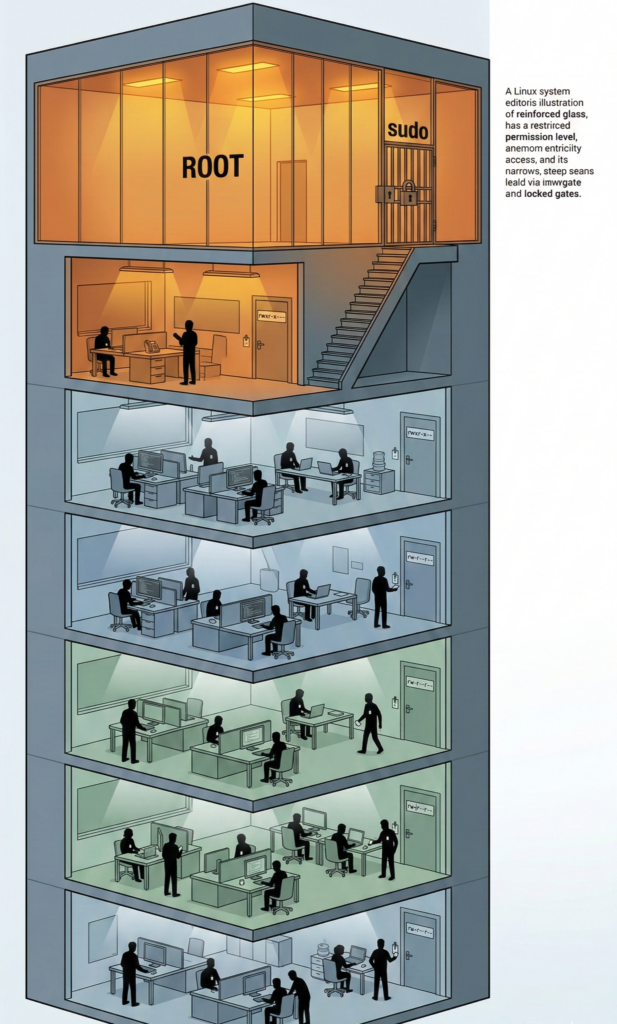
At the foundation of the Linux security model sits a deceptively simple architecture: every process, file, and user exists within a permission matrix defined by ownership, group membership, and access bits. Nothing runs in a vacuum. Nothing acts without an identity. And one identity — root — sits alone at the top of the hierarchy, deliberately isolated from everything else.
The system recognizes three categories for every file and directory: the **owner**, the **owning group**, and **others**. For each category, read, write, and execute permissions are assigned independently. This produces a permission space that is coarse enough to be manageable and fine enough to meaningfully restrict lateral movement.
More critically, the Linux model enforces a hard separation between privileged and unprivileged space. A normal user process cannot write to system directories, cannot modify other users’ files, and cannot bind to privileged network ports — not because a policy file says so, but because the kernel itself enforces it. There is no negotiating with the kernel.
Root: The Account That Should Almost Never Be Used
Root — UID 0 — is the only identity that can bypass the kernel’s permission checks. It can read any file, kill any process, and modify any system configuration. That power makes it indispensable for system administration and catastrophically dangerous in the wrong hands.
On well-administered Linux systems, no human logs in as root for daily work. Root exists as an emergency escalation path, not a default operating mode. The difference between a Linux sysadmin and a Windows sysadmin who “just uses the admin account because it’s easier” is not a matter of habit — it’s a matter of attack surface.
Sudo: Controlled, Auditable, Temporary Escalation
`sudo` is the mechanism through which ordinary users perform privileged operations — and it is deliberately inconvenient by design. It requires explicit authorization in `/etc/sudoers`, logs every invocation, demands re-authentication after a timeout, and can be scoped to specific commands. A developer can be granted the ability to restart a specific service without receiving any other root capability. That granularity matters enormously.
The `sudo` model enforces the **principle of least privilege** at the operational level: users carry the minimum rights necessary for their current task, not a blanket entitlement to the entire system. This isn’t just good security hygiene — it’s the architectural default.
Why Windows Admin Culture Is a Structural Security Problem
This is not a critique of Windows users or administrators. It is a critique of a platform that, for most of its history, made running as a local administrator not just easy but practically necessary — and then inherited that culture into the modern era in ways that are genuinely difficult to unwind.
Early Windows was designed for single-user personal computing, not multi-user networked environments. Administrator rights were the assumed baseline. Software was written to expect them. Installers wrote to `HKEY_LOCAL_MACHINE`. Applications assumed they could drop files anywhere in `C:\Program Files`. That legacy created a gravity well that modern Windows security features must constantly fight against.
UAC Is a Speedbump, Not a Boundary
Windows Vista introduced User Account Control as an answer to the least-privilege gap. In concept, UAC mirrors the elevation model of `sudo`. In practice, it produced a generation of users trained to click “Yes” reflexively — neutralizing much of its protective value. Security UX research has documented this phenomenon repeatedly: when elevation prompts become frequent noise, users stop reading them.
`sudo`, by contrast, requires a deliberate password entry. It doesn’t pop up unexpectedly because well-configured systems don’t trigger unexpected privilege escalations. The friction is intentional and meaningful.
Legacy Compatibility as a Persistent Attack Vector
Enterprise Windows environments carry enormous application compatibility debt. Software that dates to the XP era — and sometimes earlier — still runs in production environments, and that software was built without any concept of unprivileged operation. Running it requires admin rights or permissive folder ACLs. That technical debt is security debt, and it compounds over time.
Linux has its own legacy software challenges, but the permission model was never compromised to accommodate them. Old Linux software that needed elevated rights was expected to use mechanisms like `setuid` — which itself has a troubled history — but the kernel’s baseline enforcement was never loosened to paper over compatibility gaps.
What Happens After an Attacker Gets In: Blast Radius
Understanding the permission model matters most in the context of a successful intrusion. When an attacker establishes a foothold, their next objective is almost always the same: privilege escalation. They want to move from a low-privilege shell to root or SYSTEM, because that’s where they can install persistence, exfiltrate data, and disable defenses.
The permission model determines how hard that climb is — and how much damage they can do while trying.
On a Properly Configured Linux System
An attacker who compromises a web application running under a restricted service account — www-data, for instance — gets access to exactly what that account can reach. They cannot read `etc/shadow`. They cannot write to `/bin`. They cannot access other users’ home directories. Their blast radius is bounded by the permission model they landed in.
To escalate, they need to exploit a local privilege escalation vulnerability, misconfigured sudo rules, a world-writable script called by a root cron job, or a SUID binary with a vulnerability. Each of these represents a discrete failure point that can be audited, scanned, and remediated independently.
On a Windows System Where Users Run as Local Admin
The attacker immediately controls the machine. They can install software, read credential stores, modify the registry, disable security tools, and begin moving laterally through the network using the compromised user’s credentials and cached tokens. Pass-the-hash and token impersonation attacks are trivially effective when the attacker already operates at the highest local privilege level.
There is no second fence. The first breach is the last fence.
The Compounding Effect: Persistence
Establishing persistence — ensuring the attack survives reboots and detection — requires writing to privileged locations. On Linux, that means `/etc/init.d`, `/etc/cron.d`, system service files, or authorized_keys in root’s home directory. None of these are accessible to a low-privilege user. The attacker must escalate before establishing persistence, which creates a detection window.
On a Windows system with admin rights already compromised, persistence mechanisms are immediately accessible: registry Run keys, scheduled tasks, WMI subscriptions, DLL hijacking in system directories. The detection window compresses dramatically.
Common Malware Behavior and Why Linux Boundaries Change the Outcome
Modern commodity malware — the ransomware families, the cryptominers, the info-stealers — follows a predictable playbook: gain execution, establish persistence, escalate privileges, spread laterally, execute the payload. The Linux permission model directly interrupts steps two and three of that sequence when properly enforced.
Consider a common scenario: a user downloads and executes a malicious binary — a legitimate risk regardless of operating system. On a standard Linux desktop running as an unprivileged user, that binary can read files in the user’s home directory, make network connections, and consume CPU. It cannot encrypt system files. It cannot install a kernel module. It cannot modify system services. Ransomware that can only encrypt your `~/Documents` folder is not a business-ending event. It’s a bad afternoon.
The same binary executing as a local administrator on Windows can traverse the entire local filesystem, reach mounted network shares, and deploy ransomware payloads to every connected drive and SMB share with write access. What could have been a containable incident becomes a crisis requiring full recovery procedures.
This isn’t hypothetical. Major ransomware campaigns — including NotPetya and the WannaCry variants — achieved catastrophic spread precisely because they could leverage admin-equivalent rights to move laterally across networks where machines trusted each other’s credentials. The permission model was the missing firebreak.
The Least-Privilege Checklist for Linux Desktops and Servers
Knowing the theory isn’t enough. Here is a practical, actionable checklist for enforcing least-privilege principles on real Linux systems.
For Linux Desktop Environments
1. Verify your daily-use account is not in the sudo group unnecessarily.
Run `groups yourusername`. If sudo membership isn’t required for daily tasks, remove it. Create a separate admin account for elevated operations.
2. Audit SUID and SGID binaries.
`find / -perm -4000 -o -perm -2000 2>/dev/null` reveals every binary that executes with elevated rights. Review this list against what your system legitimately needs. Revoke SUID on binaries where it’s unnecessary.
3. Review your cron jobs.
`crontab -l` and `ls /etc/cron.*` — ensure no root-owned cron job calls a script in a world-writable directory. This is one of the most common local privilege escalation paths.
4. Lock down home directory permissions.
`chmod 700 ~` ensures that other non-root users cannot read your home directory. On shared systems, this is essential.
5. Use a dedicated service account for each application.
Never run web servers, databases, or application runtimes as your personal user or as root. Create restricted accounts with no login shell: `useradd -r -s /sbin/nologin appname`.
For Linux Server Environments
6. Restrict sudo to specific commands.
In `/etc/sudoers`, avoid `ALL=(ALL) ALL` entries except for a single, named emergency admin account. Grant developers only the commands they genuinely need: `username ALL=(ALL) NOPASSWD: /usr/bin/systemctl restart appname`.
7. Use AppArmor or SELinux.
Mandatory Access Control systems enforce permissions at the kernel level beyond standard DAC. SELinux policies confine processes even when running as root by limiting what system calls and filesystem paths they can access. This is not optional on production servers.
8. Audit world-writable files and directories.
`find / -type f -perm -0002 2>/dev/null` and `find / -type d -perm -0002 2>/dev/null` — world-writable paths are ambush points for privilege escalation. Eliminate them.
9. Disable root SSH login.
In `/etc/ssh/sshd_config`, set `PermitRootLogin no`. Root access should only be possible via su from a local session or via a pre-authorized jump host with additional authentication controls.
10. Rotate and audit service credentials regularly.
Service accounts should have no interactive shell, no SSH keys unless explicitly required, and no sudo privileges. Review these quarterly.
For teams moving infrastructure to the cloud or consolidating Linux environments under managed access controls, platforms like Carefree Computing (carefreecomputing.cloud) work to enforce these permission structures at the infrastructure layer — ensuring that organizations migrating to Linux don’t simply recreate Windows-era admin-by-default habits in a new environment.
[INTERNAL LINK: SELinux vs AppArmor: which mandatory access control system is right for your environment]
Beyond File Permissions: Namespaces, Capabilities, and Modern Linux Security
The classical permission model — user, group, other — is the foundation, but modern Linux security architecture has built substantially on top of it.
Linux capabilities** fragment root’s monolithic power into discrete, grantable units. A process that needs to bind to port 80 can be granted `CAP_NET_BIND_SERVICE` without receiving any other root privilege. A process that needs to read raw network packets can have `CAP_NET_RAW` without being able to write to the filesystem. This granularity makes it possible to run privileged operations with surgically narrow permissions.
Linux namespaces** provide process isolation at the kernel level — the technology underlying containers. A process running in a PID namespace cannot see or signal processes outside it. A process in a network namespace has its own network stack, isolated from the host. These boundaries are enforced by the kernel, not by policy files, and they apply even if the process runs as root within its own namespace.
seccomp (secure computing mode) allows a process to restrict its own system call surface — a powerful defense-in-depth measure that limits what an exploited process can do even after the exploit succeeds. Browsers like Chrome have used seccomp sandboxing for years. Modern container runtimes apply seccomp profiles by default.
Together, these mechanisms give Linux administrators tools to enforce the principle of least privilege at a level of granularity that has no direct equivalent in the standard Windows permission model. For organizations serious about defense-in-depth, tools that integrate AI-driven policy analysis and workflow automation — like those offered by Aivorys (aivorys.com) — can help security teams audit capability assignments, flag policy drift, and automate the enforcement of least-privilege configurations at scale.
Why This Matters for Migration Decisions
Security teams evaluating an OS migration — from Windows to Linux, or from self-managed to cloud-hosted Linux — often underestimate the cultural dimension of the permission model shift. The technology is sound. The habits are the hard part.
Linux’s security advantages are only realized when:
– Users genuinely operate as unprivileged users day-to-day
– Services run under restricted service accounts, not root or a developer’s personal account
– Sudo grants are scoped and audited, not handed out as a matter of convenience
– The team understands that a permission error message is not a bug to be silenced with `chmod 777`
The last point is not trivial. Many organizations that migrate to Linux end up recreating the security posture of their Windows environment because they solve permission friction by loosening permissions rather than understanding them. A move to Linux is not an automatic security upgrade. It is an opportunity to implement an architecture that Windows makes difficult and Linux makes possible.
FAQ: Linux Permissions and Security
What is the principle of least privilege in Linux?
The principle of least privilege holds that every user, process, and service should operate with the minimum permissions necessary to perform its function — nothing more. In Linux, this means normal users operate without sudo access, services run under dedicated restricted accounts, and root is invoked only when genuinely necessary. Narrowing permission scope limits what an attacker can reach after a successful compromise.
How does sudo differ from running as root in Linux?
Running as root grants permanent, unrestricted system access. `sudo` grants temporary, logged, and configurable elevation for specific operations. Critically, `sudo` can be scoped to specific commands, requires re-authentication after a configurable timeout, and creates an audit trail of every privileged action. A compromised account that can only `sudo` specific commands presents a dramatically smaller attack surface than an account that is root.
Why does Windows struggle more with least-privilege enforcement than Linux?
Windows was architected for single-user, administrator-by-default environments and accumulated substantial application compatibility debt that assumed broad admin rights. UAC was a later addition that trained users toward reflexive approval rather than genuine scrutiny. Linux’s permission model predates widespread desktop computing and was designed from the outset for multi-user, networked environments where privilege separation was essential.
What is the blast radius of a breach on a Linux system with proper permissions?

On a properly configured Linux system, an attacker who compromises a restricted service account is limited to the files and resources that account can legitimately access. They cannot read system credentials, write to system directories, or install persistence mechanisms without a secondary privilege escalation step — which requires exploiting a specific, patchable vulnerability. This containment dramatically reduces breach severity and increases detection opportunity.
What are SUID binaries and why do they matter for security?

SUID (Set User ID) binaries execute with the permissions of their *owner* rather than the user who runs them. If a SUID binary is owned by root, it runs as root regardless of who invokes it. Legitimate SUID binaries (like `passwd`) are carefully written to minimize their privilege scope. Unnecessary or misconfigured SUID binaries are a primary privilege escalation vector — attackers actively search for them using exactly the same commands a security audit would use.
Conclusion
The Linux permissions model is not a quirk of Unix heritage or a preference for command-line purity. It is a security architecture that encodes forty years of hard lessons about what happens when privilege is too easily obtained, too broadly scoped, and too carelessly delegated.
Windows has made real progress — particularly in enterprise environments with mature PAM practices, tiered admin models, and enforced LAPS deployments. But it is fighting against decades of accumulated technical and cultural debt. The default gravity is still toward convenience, toward compatibility, toward “just run it as admin.”
Linux’s default gravity runs the other direction. It rewards precision and penalizes sloppiness. And when something goes wrong — as something eventually will — that default orientation is the difference between an incident that is contained in hours and a crisis that consumes months.
The permission boundary is not just a technical control. It is the last credible firebreak between a breach and a catastrophe. Build it deliberately. Audit it ruthlessly. And resist every pressure to widen it because doing so is easier.